


{{ obj.review }}


Cookies & Privacy
This website uses cookies or similar techonoglies to enhance your browsing experience and provide personalized recommendations. By contrinuing to use our website, you agre... Privacy Policy
In-Out Notification to Parents App l Attendance via App (Incase of no electricity) | Touch-Free...
Category: Management Software
{{ obj.review }}

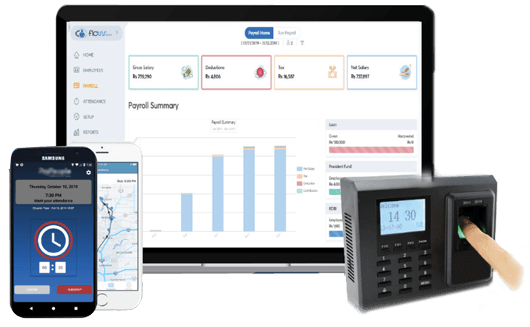
Attendance via Smart ID Card एक आधुनिक उपस्थिति प्रणाली हो, जसले विद्यार्थीहरूलाई डिजिटल रूपमै Attendance ट्र्याक गर्न सहयोग गर्छ। यसमा दुई प्रकारका Hardware Device प्रयोग गरिन्छ – Real-Time Biometric Device र ZKTeco ZKT40 Smart Card Reader। विद्यार्थीले विद्यालयमा प्रवेश गर्दा कार्ड स्क्यान वा फिंगरप्रिन्ट मार्फत उपस्थिति दर्ज हुन्छ।
यस प्रणालीले तुरुन्तै Attendance Software मा Data Sync गर्छ र अनुपस्थित विद्यार्थीको Guardian लाई Real-Time SMS Notification पठाउँछ। Manual Attendance, Reporting, र Monitoring को लागि पूर्ण Dashboard सुविधा पनि उपलब्ध छ।


Real-Time Biometric Device र ZKTeco ZKT40 Smart Card Reader को Installation तथा Configuration
Hardware को Troubleshooting: device not syncing, card read नगर्ने, biometric mismatch
Attendance device को Network सेटअप र Internet Sync समस्या समाधान
Firmware updates र regular maintenance सेवा
Assign to Device (Bulk/Student) प्रक्रिया को प्राविधिक सहयोग
Attendance Software को Installation, Dashboard Access, र Settings Configuration
Logs View, Absent List, Manual Attendance Entry, SMS Alert configuration को मार्गदर्शन
Guardian SMS System को setup, time-based alert customization
Download Software from panel & regular updates को जानकारी
Multi-device management & Data backup process को support
Nepali र English दुवै भाषामा User Manual, Quick Start Guide
Helpdesk सेवा (Call, Email, WhatsApp) मार्फत 24x7 सहयोग
Live Zoom/Remote Support for Admin/Operator
School IT/Account स्टाफलाई Software संचालन सम्बन्धी प्रशिक्षण
Orientation Session with practical use-case demonstrations

Q1: Attendance via Smart ID Card के हो?
Ans: यो एक डिजिटल प्रणाली हो जसले स्मार्ट ID कार्ड स्क्यान गरेर विद्यार्थीहरूको उपस्थिति स्वचालित रूपमा रेकर्ड गर्छ।
Q2: कुन Hardware यो सिस्टमसँग Compatible छ?
Ans: हाम्रो Software ZKT-40 र अन्य Real Time Supported Devices सँग Support गर्छ।
Q3: के अभिभावकहरूले जानकारी प्राप्त गर्छन्?
Ans: हो, अनुपस्थित विद्यार्थीको Guardian लाई SMS तुरुन्तै पठाइन्छ।
Q4: के यो प्रणालीले छुट्टी र ढिला आउने पनि ट्र्याक गर्छ?
Ans: हो, System ले छुट्टी, ढिला आउनु, र समयमै निस्कनु जस्ता Detail Information राख्छ।

Q5: कसरी Student लाई Device मा Assign गर्ने?
Ans: तपाईंले Assign to Device(Student) वा Assign to Device(Bulk) feature प्रयोग गरेर विद्यार्थीहरूलाई Device मा Assign गर्न सक्नुहुन्छ।
Q6: Attendance Logs हेर्ने तरिका के हो?
Ans: Dashboard मा गएर View Attendance Logs क्लिक गरेर दैनिक/मासिक उपस्थिति रिपोर्ट हेर्न सकिन्छ।
Q7: Manual Attendance के हो?
Ans: कुनै कारणवश ID स्क्यान नहुने अवस्था भएमा, तपाईंले Manual Attendance (Assign) विकल्प प्रयोग गर्न सक्नुहुन्छ।
Q8: Software कसरी Download गर्ने?
Ans: मुख्य Dashboard बाट Download Software विकल्पमा क्लिक गरेर सजिलै डाउनलोड गर्न सकिन्छ।

Q9: Absent List कहाँ हेर्न सकिन्छ?
Ans: Dashboard मा Absent List विकल्पमा क्लिक गरेपछि अनुपस्थित विद्यार्थीहरूको सूची देखिन्छ।
Q10: कसरी Assign भएका User को List हेर्ने?
Ans: Assigned Users मा गएर हाल Device मा Assign भएका सबै विद्यार्थीहरूको विवरण हेर्न सकिन्छ।
Q11: के रिपोर्ट Export गर्न सकिन्छ?
Ans: हो, Attendance Logs, Absent List लगायतका रिपोर्टहरू Excel वा PDF मा Download गर्न सकिन्छ।
Q12: Setting customization गर्न सकिन्छ?
Ans: हो, Setting विकल्पबाट SMS Notification, Time Format, र अन्य Alert Parameters सेट गर्न सकिन्छ।
Q1: Attendance via Smart ID Card के हो?
Ans: यो एक डिजिटल प्रणाली हो जसले स्मार्ट ID कार्ड स्क्यान गरेर विद्यार्थीहरूको उपस्थिति स्वचालित रूपमा रेकर्ड गर्छ।
Q2: कुन Hardware यो सिस्टमसँग Compatible छ?
Ans: हाम्रो Software ZKT-40 र अन्य Real Time Supported Devices सँग Support गर्छ।
Q3: के अभिभावकहरूले जानकारी प्राप्त गर्छन्?
Ans: हो, अनुपस्थित विद्यार्थीको Guardian लाई SMS तुरुन्तै पठाइन्छ।
Q4: के यो प्रणालीले छुट्टी र ढिला आउने पनि ट्र्याक गर्छ?
Ans: हो, System ले छुट्टी, ढिला आउनु, र समयमै निस्कनु जस्ता Detail Information राख्छ।
Q5: कसरी Student लाई Device मा Assign गर्ने?
Ans: तपाईंले Assign to Device(Student) वा Assign to Device(Bulk) feature प्रयोग गरेर विद्यार्थीहरूलाई Device मा Assign गर्न सक्नुहुन्छ।
Q6: Attendance Logs हेर्ने तरिका के हो?
Ans: Dashboard मा गएर View Attendance Logs क्लिक गरेर दैनिक/मासिक उपस्थिति रिपोर्ट हेर्न सकिन्छ।
Q7: Manual Attendance के हो?
Ans: कुनै कारणवश ID स्क्यान नहुने अवस्था भएमा, तपाईंले Manual Attendance (Assign) विकल्प प्रयोग गर्न सक्नुहुन्छ।
Q8: Software कसरी Download गर्ने?
Ans: मुख्य Dashboard बाट Download Software विकल्पमा क्लिक गरेर सजिलै डाउनलोड गर्न सकिन्छ।
Q9: Absent List कहाँ हेर्न सकिन्छ?
Ans: Dashboard मा Absent List विकल्पमा क्लिक गरेपछि अनुपस्थित विद्यार्थीहरूको सूची देखिन्छ।
Q10: कसरी Assign भएका User को List हेर्ने?
Ans: Assigned Users मा गएर हाल Device मा Assign भएका सबै विद्यार्थीहरूको विवरण हेर्न सकिन्छ।
Q11: के रिपोर्ट Export गर्न सकिन्छ?
Ans: हो, Attendance Logs, Absent List लगायतका रिपोर्टहरू Excel वा PDF मा Download गर्न सकिन्छ।
Q12: Setting customization गर्न सकिन्छ?
Ans: हो, Setting विकल्पबाट SMS Notification, Time Format, र अन्य Alert Parameters सेट गर्न सकिन्छ।
This website uses cookies or similar techonoglies to enhance your browsing experience and provide personalized recommendations. By contrinuing to use our website, you agre... Privacy Policy